
大綱
- 收集盤後資料
- 建立資料庫
- 計算均線
- 回報均線的位置和看盤工具比較
- 建立自動化
- 建立通知機制
收集盤後資料
參考 https://ithelp.ithome.com.tw/m/articles/10218918
實際操作 :
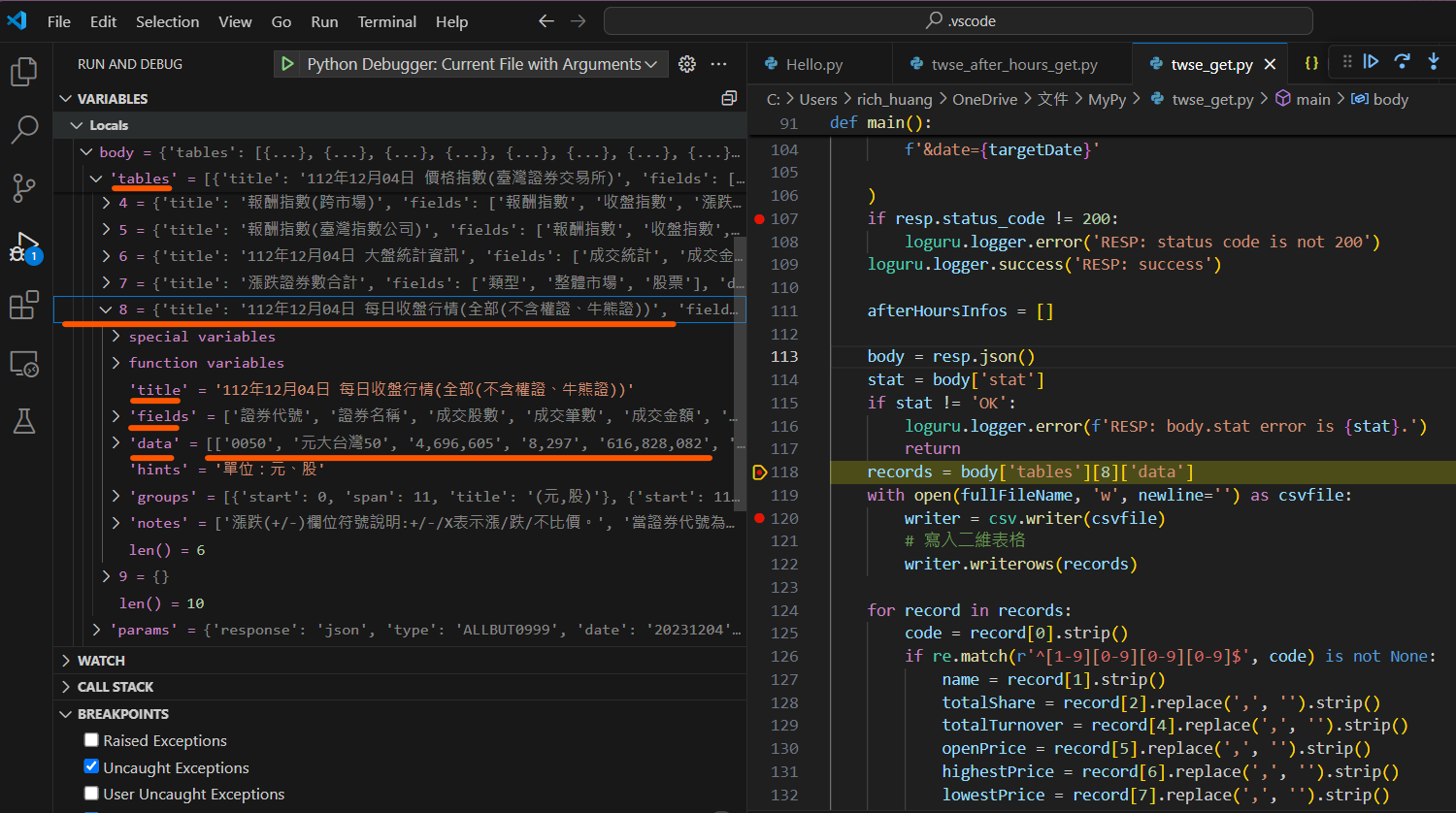
python程式: twse_after_hours_get.py
./twse_after_hours_get.py 資料庫位置 日期
取得的資料會存成 csv 檔, 用日期當檔名, 放在資料庫位置資料夾裡
ex:
./twse_after_hours_get.py /mnt/c/Users/rich_huang/Documents/twse_AfterHours 20241204
./twse_after_hours_get.py /mnt/c/Users/rich_huang/Documents/twse_AfterHours 20241205
| rich_huang@rich-dell-5415:/mnt/c/Users/rich_huang/Documents/MyPy$ ls -lst /mnt/c/Users/rich_huang/Documents/twse_AfterHours/20241204.csv 152 -rwxrwxrwx 1 rich_huang rich_huang 155395 Dec 4 21:43 /mnt/c/Users/rich_huang/Documents/twse_AfterHours/20241204.csv |
建立資料庫
使用批次腳本方式取得更多營業日的資料, 腳本如下:
twse_mget.sh (run bash script in WSL “Windows Subsystem Linux”, DOS batch 很難寫, 也很難讀)
| #!/usr/bin/bash
TargetDate=$1 NumOfDays=$2 echo “Taget date is : $TargetDate” echo “Number of days before taget date : $NumOfDays” echo “The dates are :” for (( i = 1; i <= $NumOfDays; i++ )) do t_date=$(date -d ” $i day ago $TargetDate” +%Y%m%d) echo $t_date ./twse_after_hours_get.py /mnt/c/Users/rich_huang/Documents/twse_AfterHours $t_date done |
命令:
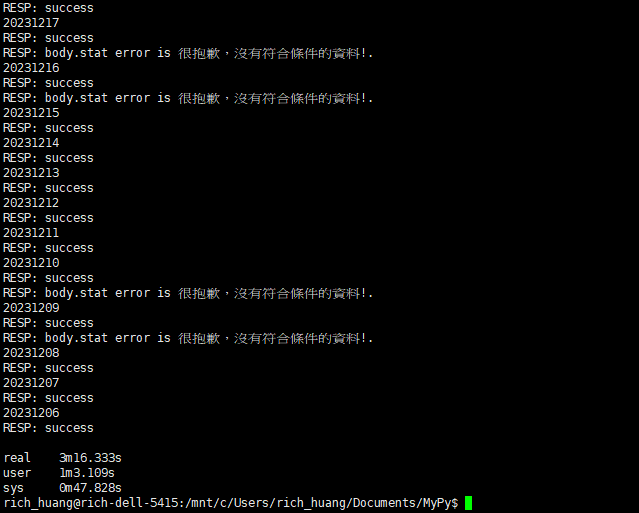
time ./twse_mget.sh 20241205 365 # 從指定日期往過去查找365天, 有資料就抓下來
| rich_huang@rich-dell-5415:/mnt/c/Users/rich_huang/Documents/MyPy$ find /mnt/c/Users/rich_huang/Documents/twse_AfterHours -type f | wc -l
241 |
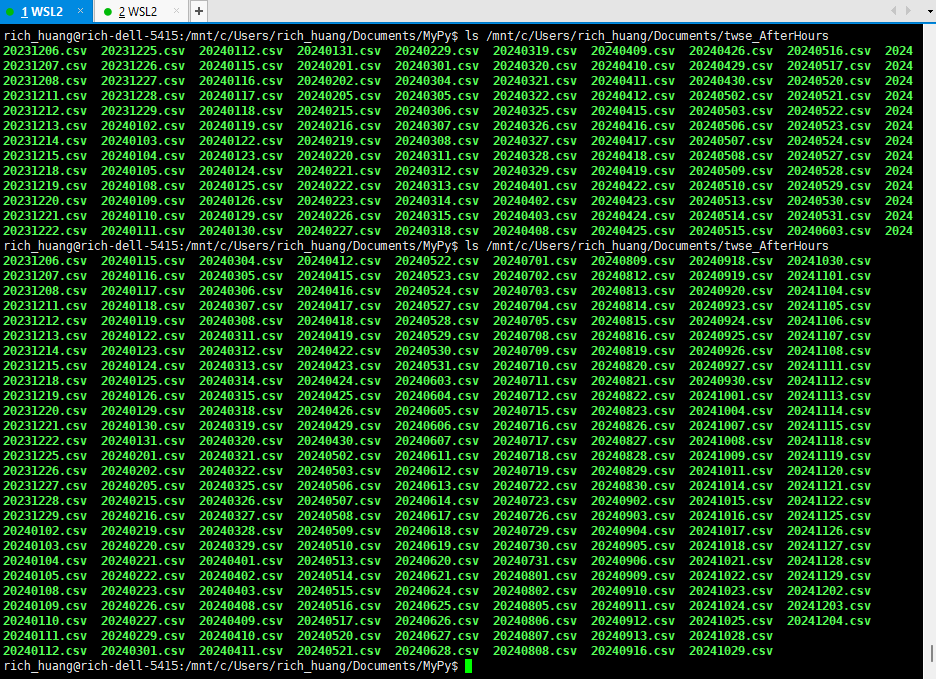
費時3分16秒, 抓了241個檔案 (一般一週只有五個營業日)
 |
…
| rich_huang@rich-dell-5415:/mnt/c/Users/rich_huang/Documents/MyPy$ find /mnt/c/Users/rich_huang/Documents/twse_AfterHours -type f | wc -l
483 rich_huang@rich-dell-5415:/mnt/c/Users/rich_huang/Documents/MyPy$ du -sh /mnt/c/Users/rich_huang/Documents/twse_AfterHours 70M /mnt/c/Users/rich_huang/Documents/twse_AfterHours |
…
目前資料庫裡已經有抓取了兩年的資料, 483個 csv 檔案, 約70MB , 筆電應該承受得起 (養得起)
計算均線
接下來可做大數據分析了
moveing_average.py start_date num_of_days stock_code fraction
程式操作說明 :
start_date : 均線計算的起始日
num_of_days : 起始日往前的天數 (過去的日子, 所以人家說看著技術線操作股票是”看著照後鏡開車”)
stock_code : 股票代號
fraction : !! 這我自訂的名詞, 均線糾結在視覺上非常主觀, 每個人的感覺不一定一樣 !!
把三條均線 (sma05, sma20, sma60) 加總除以三 當作參考值
sma_mean=(sma05+sma20+sma60)/3
[ 均線 跟 meam 的距離 (差的絕對值) / mean ] 我稱為fraction (分數 : 分子/分母), 分數越小表示三條均線越靠近
moveing_average.py :
| #!/usr/bin/python
import datetime import fractions import json import sys import os import re
import loguru import requests import csv
from pathlib import Path
def moving_average(priceC,average_period): SMA = [] totalOperateDays = len(priceC) for i in range(totalOperateDays-average_period) : priceSum = 0.0 for j in range(average_period) : priceSum += priceC[i+j] priceSum = priceSum/average_period SMA.append(priceSum) return SMA
def in_fraction(a,b,c,fraction): mean=(a+b+c)/3.0 #print(“mean,fraction:”,mean,fraction) if (abs(a-mean)/mean <= fraction) and (abs(b-mean)/mean <= fraction) and (abs(c-mean)/mean <= fraction) : return True else : return False
def main(): dataBasePath = sys.argv[1] start_date = sys.argv[2] num_of_days = sys.argv[3] stock_code = sys.argv[4] fraction = float(sys.argv[5])
ref_date = datetime.datetime.strptime(start_date,’%Y%m%d’) #print(ref_date) #print(ref_date.strftime(“%Y%m%d”))
operateDate = [] #營業日 priceC = [] #收盤價 SMA05 = [] #週均線 SMA20 = [] #月均線 SMA60 = [] #季均線 for i in range(int(num_of_days)): target_date = ref_date – datetime.timedelta(days=i) #concatenate filename with csv extention fileName = target_date.strftime(“%Y%m%d”) + ‘.’ + ‘csv’ #concatenate full path of filename target_file = os.path.join(dataBasePath,fileName) #print(“target file : “, target_file) if not Path(target_file).is_file() : #print(” file not exist\n”) continue else : #print(” file exist\n”) operateDate.append(target_date.strftime(“%Y%m%d”)) with open(target_file, ‘r’, newline=”) as csvfile: reader = csv.reader(csvfile) for row in reader: # comapre with stock code if (row[0] == stock_code) : priceC.append(float(row[8].replace(‘,’, ”).strip())) break else : continue
#觀察期內的營業日總數 SMA05 = moving_average(priceC,5) SMA20 = moving_average(priceC,20) SMA60 = moving_average(priceC,60)
# 尋找均線糾結 totalOperateDays = len(priceC) match_period=60 #fraction=0.005 inFraction=False #print(“totalOperateDays,match_period:”,totalOperateDays,match_period) latestInFractionDate=None for i in range(totalOperateDays-match_period) : if in_fraction(SMA05[i],SMA20[i],SMA60[i],fraction) : inFraction = True if latestInFractionDate == None : latestInFractionDate = operateDate[i] print(“in fraction, operate_date : “, fraction, operateDate[i])
”’ print(“The latest date of SMA60”, operateDate[len(SMA60)-1]) print(“SMA05 “, SMA05) print(“\n”) print(“SMA20 “, SMA20) print(“\n”) print(“SMA60 “, SMA60) print(“\n”) ”’ if inFraction : print(“latest fraction date : “, latestInFractionDate) #os._exit(0) #else : #os._exit(1)
if __name__ == ‘__main__’: main() |
那麼, fraction要多小才算均線糾結?
我選四個數字來觀察比較看看
.02 (2%), 0.01 (1%), 0.0075 (0.75%), 0.005 (0.5%)
回報均線的位置和看盤工具比較
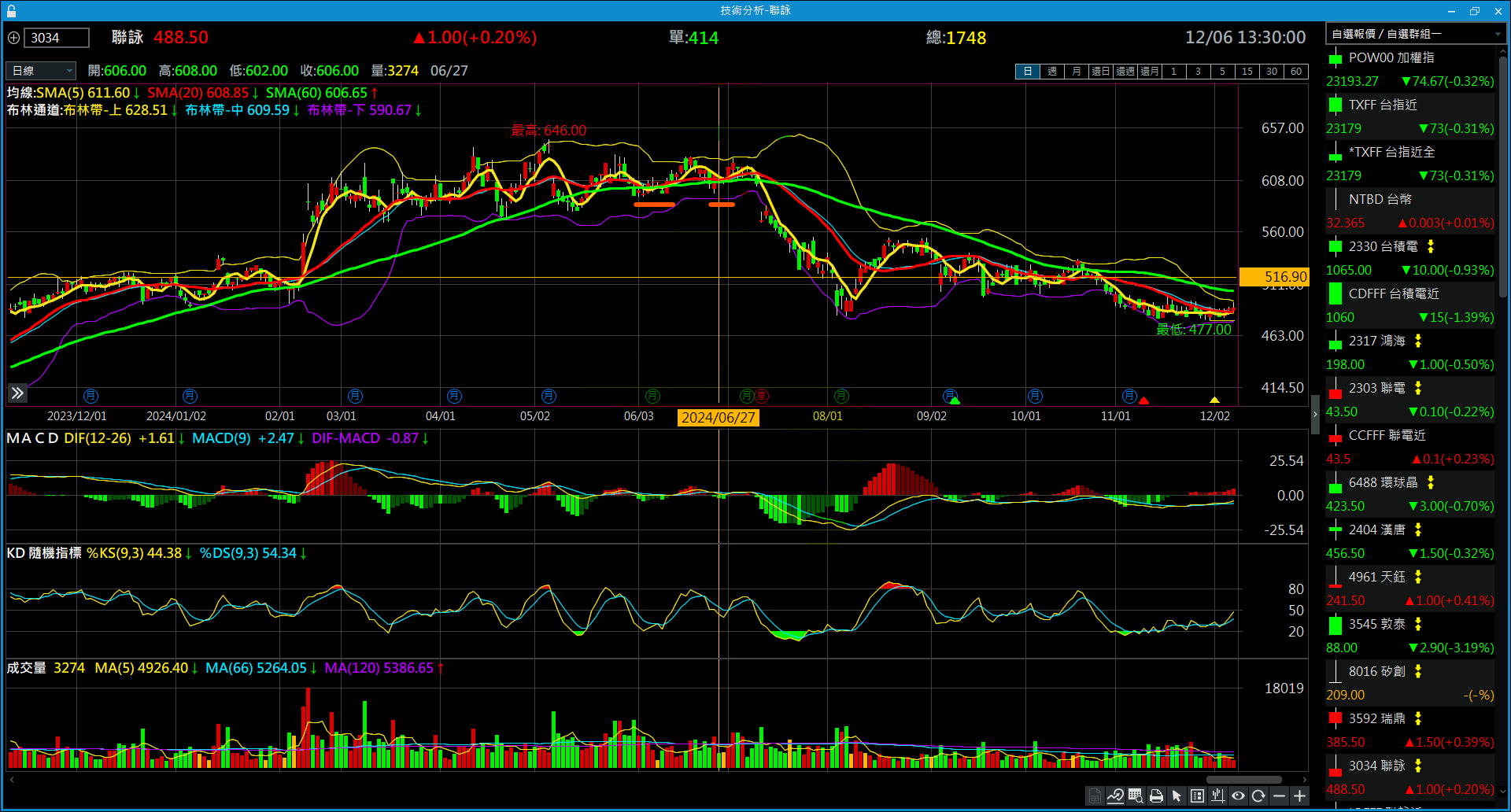
以聯詠(3034)為範例
| rich_huang@rich-dell-5415:/mnt/c/Users/rich_huang/Documents/MyPy$ time ./moving_average.py /mnt/c/Users/rich_huang/Documents/twse_AfterHours 20241205 360 3034 0.005
2024-12-05 00:00:00 20241205 totalOperateDays match_period 238 60 in fraction, operate_date 0.005 20240701 in fraction, operate_date 0.005 20240628 in fraction, operate_date 0.005 20240627 in fraction, operate_date 0.005 20240614 in fraction, operate_date 0.005 20240613 in fraction, operate_date 0.005 20240612 in fraction, operate_date 0.005 20240611 in fraction, operate_date 0.005 20240607 in fraction, operate_date 0.005 20240606 in fraction, operate_date 0.005 20240605 in fraction, operate_date 0.005 20240604 in fraction, operate_date 0.005 20240603
real 0m0.703s user 0m0.484s sys 0m0.219s |
對照 三竹的 “技術分析” 圖
 |
| rich_huang@rich-dell-5415:/mnt/c/Users/rich_huang/Documents/MyPy$ time ./moving_average.py /mnt/c/Users/rich_huang/Documents/twse_AfterHours 20241205 360 3034 0.0075
2024-12-05 00:00:00 20241205 totalOperateDays match_period 238 60 in fraction, operate_date 0.0075 20241028 in fraction, operate_date 0.0075 20241025 in fraction, operate_date 0.0075 20241024 in fraction, operate_date 0.0075 20240710 in fraction, operate_date 0.0075 20240709 in fraction, operate_date 0.0075 20240703 in fraction, operate_date 0.0075 20240702 in fraction, operate_date 0.0075 20240701 in fraction, operate_date 0.0075 20240628 in fraction, operate_date 0.0075 20240627 in fraction, operate_date 0.0075 20240626 in fraction, operate_date 0.0075 20240617 in fraction, operate_date 0.0075 20240614 in fraction, operate_date 0.0075 20240613 in fraction, operate_date 0.0075 20240612 in fraction, operate_date 0.0075 20240611 in fraction, operate_date 0.0075 20240607 in fraction, operate_date 0.0075 20240606 in fraction, operate_date 0.0075 20240605 in fraction, operate_date 0.0075 20240604 in fraction, operate_date 0.0075 20240603 in fraction, operate_date 0.0075 20240531 in fraction, operate_date 0.0075 20240521
real 0m0.581s user 0m0.438s sys 0m0.141s |
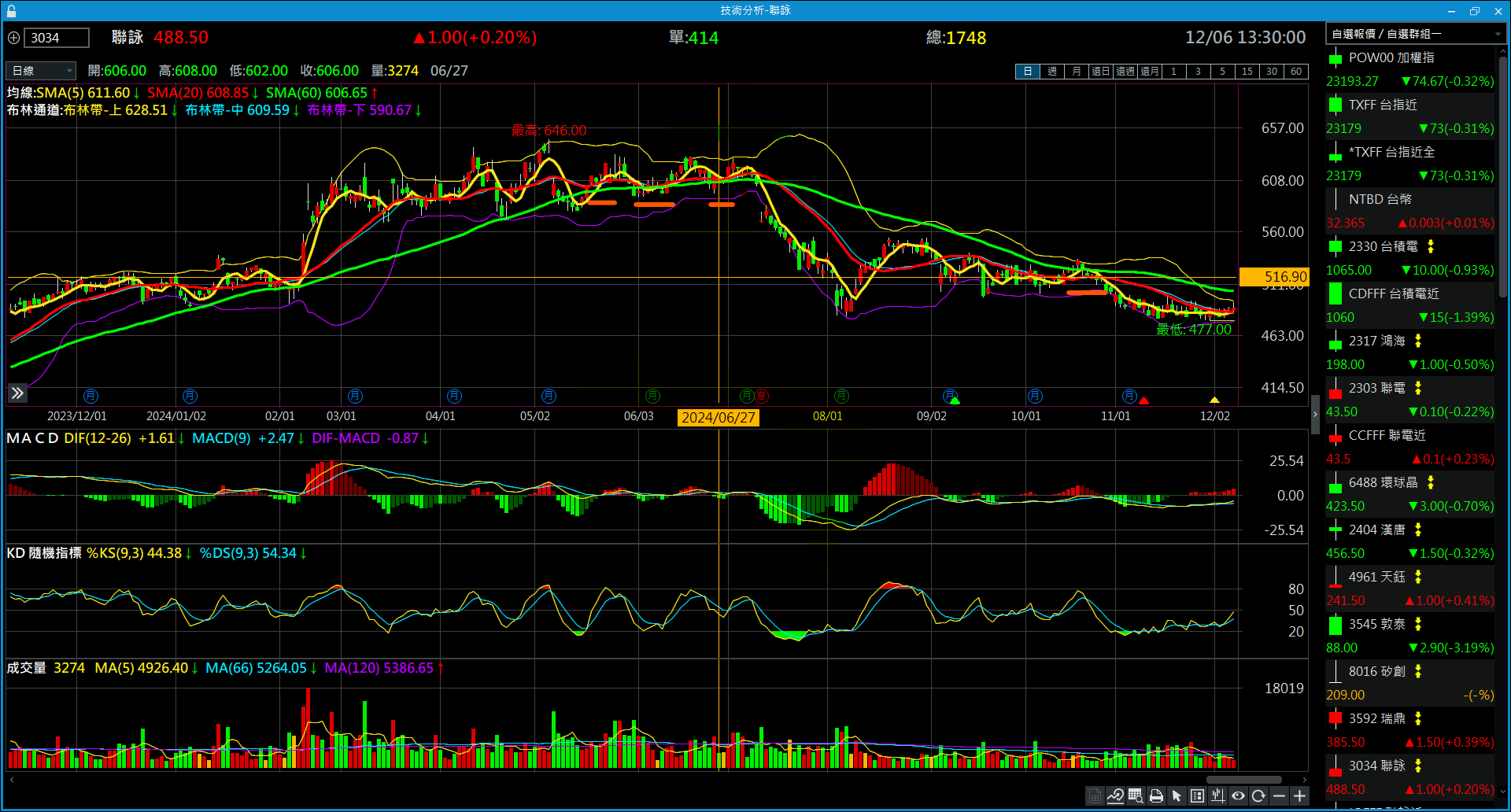 |
個人覺得 fraction : %0.75 跟 “技術分析”圖的感覺最接近
| rich_huang@rich-dell-5415:/mnt/c/Users/rich_huang/Documents/MyPy$ time ./moving_average.py /mnt/c/Users/rich_huang/Documents/twse_AfterHours 20241205 360 3034 0.01
2024-12-05 00:00:00 20241205 totalOperateDays match_period 238 60 in fraction, operate_date 0.01 20241028 in fraction, operate_date 0.01 20241025 in fraction, operate_date 0.01 20241024 in fraction, operate_date 0.01 20241023 in fraction, operate_date 0.01 20241022 in fraction, operate_date 0.01 20241021 in fraction, operate_date 0.01 20241018 in fraction, operate_date 0.01 20240710 in fraction, operate_date 0.01 20240709 in fraction, operate_date 0.01 20240708 in fraction, operate_date 0.01 20240705 in fraction, operate_date 0.01 20240704 in fraction, operate_date 0.01 20240703 in fraction, operate_date 0.01 20240702 in fraction, operate_date 0.01 20240701 in fraction, operate_date 0.01 20240628 in fraction, operate_date 0.01 20240627 in fraction, operate_date 0.01 20240626 in fraction, operate_date 0.01 20240618 in fraction, operate_date 0.01 20240617 in fraction, operate_date 0.01 20240614 in fraction, operate_date 0.01 20240613 in fraction, operate_date 0.01 20240612 in fraction, operate_date 0.01 20240611 in fraction, operate_date 0.01 20240607 in fraction, operate_date 0.01 20240606 in fraction, operate_date 0.01 20240605 in fraction, operate_date 0.01 20240604 in fraction, operate_date 0.01 20240603 in fraction, operate_date 0.01 20240531 in fraction, operate_date 0.01 20240530 in fraction, operate_date 0.01 20240522 in fraction, operate_date 0.01 20240521 in fraction, operate_date 0.01 20240520
real 0m0.608s user 0m0.391s sys 0m0.219s |
(略 …..)
fraction 0.02 就不印出來了
使用 Jenkins 進行每日盤後資料收集, 均線糾結計算
安裝Jenkins之前, 需要安裝 java JDK
Installation of the JDK on Microsoft Windows Platforms
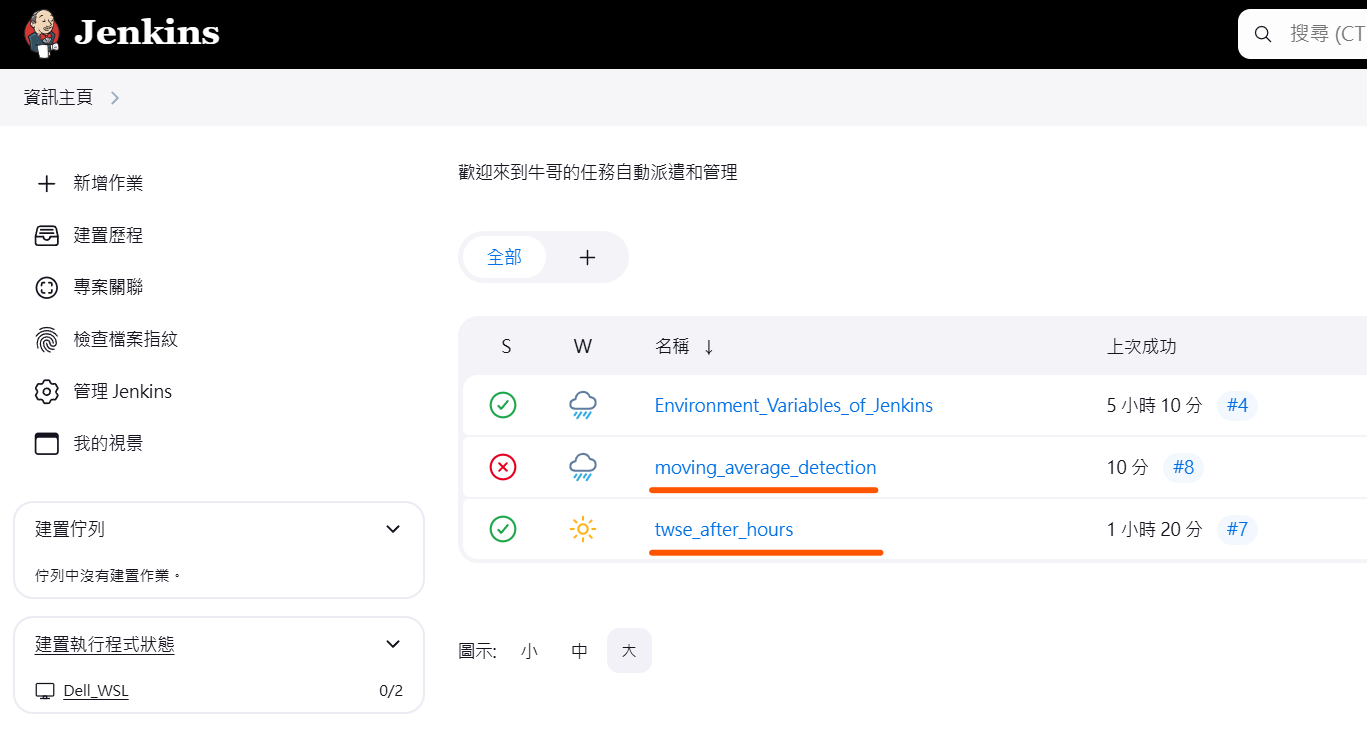
目前我的Jenkins 主要有兩個專案
- twse_after_hours
- moving_average_detection
 |
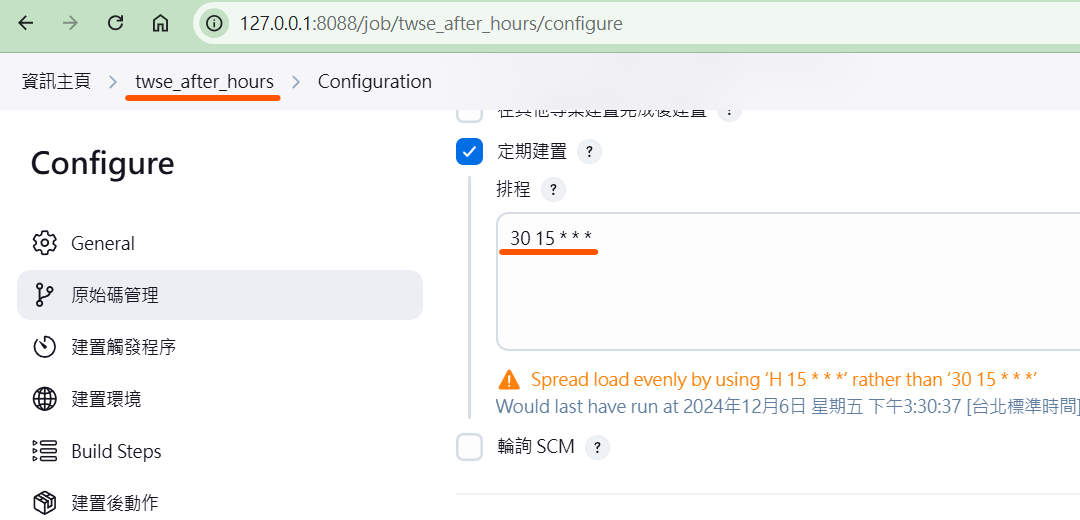
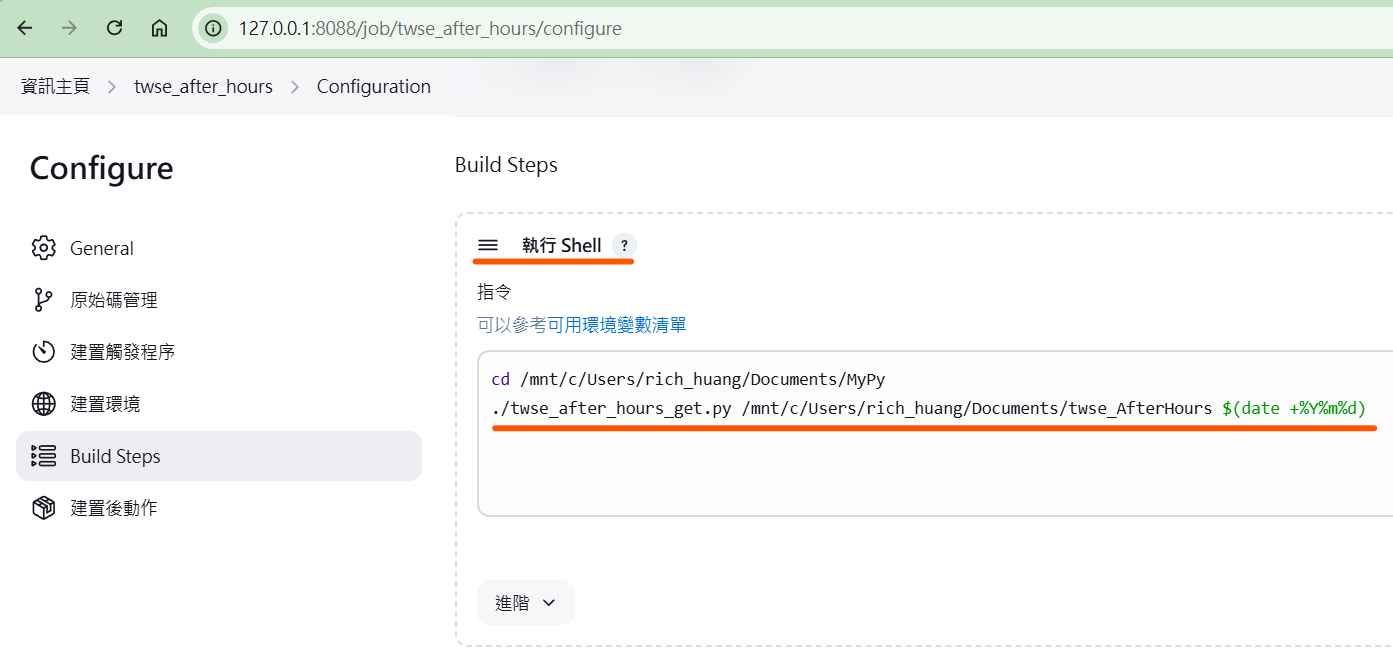
Job : twse_after_hours (抓台股盤後資料)
每天下午三點半執行一次
 |
 |
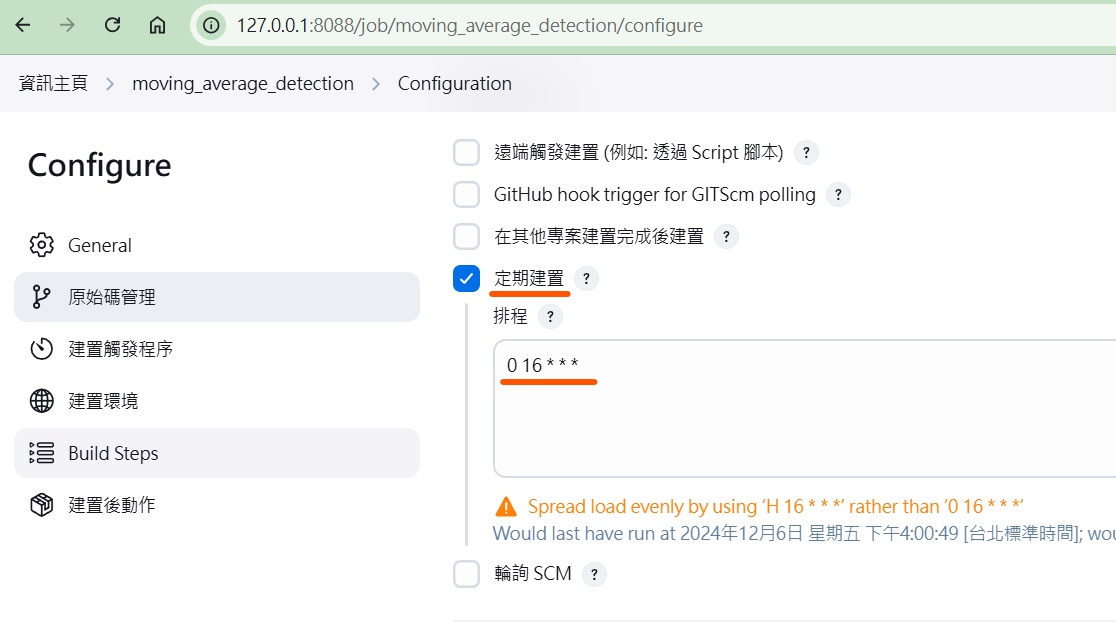
Job : moving_average_detection (均線糾結計算和偵測)
每天下午四點執行一次
 |
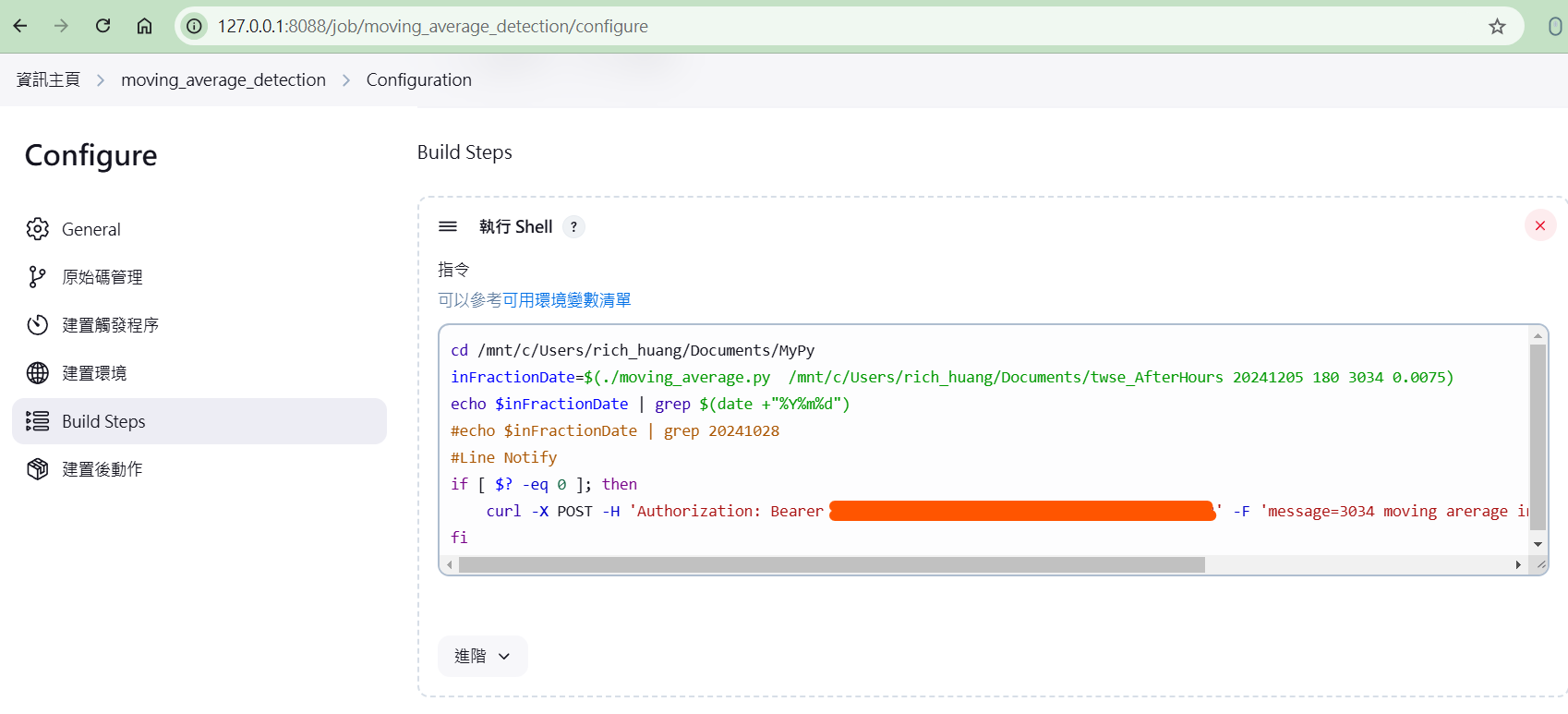
使用 Line Notify 通知 “均線糾結”
參考 : 藉由命令列模式使用LINE Notify發送訊息到LINE
如果當天有 “均線糾結” 的話透過Line Notify 通知
 |
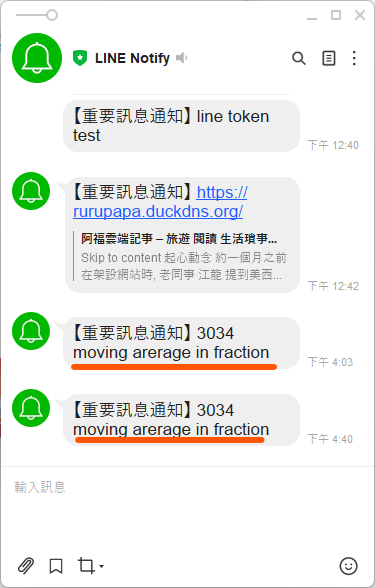
Line Notify 通知畫面如下:
 |